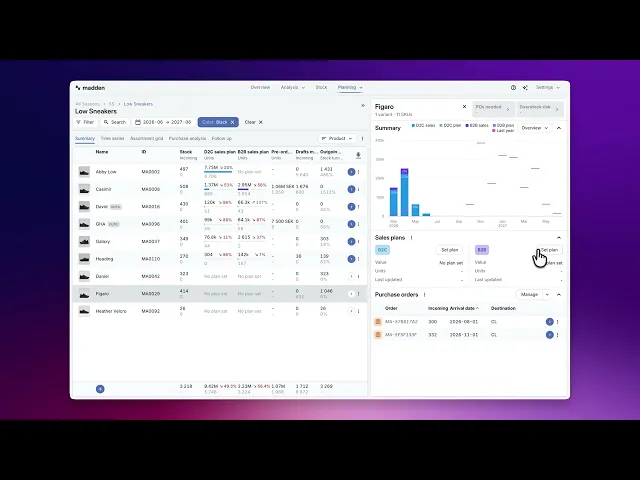
Create your Sales Plans
Choose the forecast model, sales period, size split, and segment split before saving a plan.
A sales plan is the demand plan Madden uses when you move from planning into purchasing. In Plan & Buy, the Set sales plan workflow lets you choose the forecast basis, review the timing of demand, adjust size and segment splits, and save the result for the selected products and channel.
The sales plan is the starting point for purchase planning. A better sales plan gives Madden a better demand signal when it later tries to buy enough stock to cover demand while keeping stock on hand as low as possible given all selected parameters.
Start from the Summary view
Go to Plan & Buy and open the Summary tab.
Use filters or the hierarchy arrow to select the product, variant, category, season, or other level you want to plan.
Choose Set plan from the Sales plans section in the sidebar. If your account uses both D2C and B2B, choose the channel you want to plan.
You can set a plan for one variant or for a larger group. When planning several variants at once, Madden adds bulk controls so the total forecast can be distributed or scaled across the underlying variants.
Choose the forecast model
The forecast model is the most important choice. It decides where the first version of the plan comes from and which supporting controls are available.
Forecast model | Use it when | What to check |
|---|---|---|
Madden | You want Madden to model demand from the selected product context, related products, and recent trends. | Use auto-update when you want the plan to refresh as new Madden forecasts become available. Auto-update makes some downstream split settings read-only. |
Year-over-year | Last year's sales pattern is a good starting point and you mainly want to scale it up or down. | Check that last year's timing still makes sense for the current season and if you want correct for any trend by scaling the forecast. |
Reference product | Comparable products should define the forecast, especially when the current item does not have reliable own history. | Choose references carefully. The selected references affects forecast volume, timing, size split, and discount assumptions. |
Product release | You are planning a launch and want to copy a reference product's sales pattern from its launch date. | Set the sales period start date. Madden uses it as the launch anchor. |
From pre-orders | B2B only. Use when pre-orders are the strongest demand signal for the selected products. | Review whether the shown pre-order coverage represents the full customer base or only part of expected demand. |
Total units | You already know the unit target and want Madden to distribute it over time. | Choose the distribution basis: product history, category history, current distribution, or budget when available. |
Review the plan over time
The graph shows planned volume over time. Depending on the model, you can refresh the forecast, scale it, adjust the sales period, or manually edit the shape. This matters because purchase planning needs to know not only how many units you expect to sell, but when that demand occurs.
Use the sales period to limit the active selling window. For launch planning, the start date is especially important because it anchors the copied release curve. If you add sales weeks, Madden derives the end date from the start date and selected duration.
Plan multiple variants at the same time
When the selected scope includes several variants shows a Variant block. Depending on the forecast model, the block either distributes one shared forecast across variants or lets each variant keep a model baseline and receive its own scale adjustment.
Scale – each variant already has its own baseline and you want to increase or decrease variants individually.
Distribution – one shared total should be split across variants, for example by expected share of demand.
Check size, segment, and discount assumptions
Size split: Controls how planned units are distributed across SKUs and sizes. The split usually needs to total 100%. Choose Madden, sales history, pre-orders, or reference product depending on which source best represents the expected size curve.
Segment split: Controls how planned units are distributed across visible segments or subsegments when that applies to your account. This is important when the same product has different demand across channels, markets, or customer groups.
Discount and return rate: Review the average assumptions shown in the workflow, especially when matching references or pre-orders. These assumptions affect value and margin expectations, not only unit volume.
Initial allocation: When available, use it to preview the starting allocation setup that should accompany the sales plan.
Save the plan
Use Save to write the sales plan. Use Save and update purchase plan when you want to continue directly into purchase-order planning after the sales plan is saved.
After saving, the sales plan becomes one of the key inputs for purchasing. Madden uses it together with current stock, incoming stock, MOQ, lead times, safety stock, and order settings to suggest how to cover demand while minimizing unnecessary stock on hand.
Tips
If a reference-based model will not save, check that references are configured.
If a Product release plan will not save, check that the sales period start date is set.
If a distribution warning appears, adjust the split or use the fix action so the distribution totals 100%.
If a size curve looks flat, either adjust it or explicitly accept the warning before saving.