Match and Update Parent Budgets
Keep parent and child budget levels aligned while controlling which rows change.

Parent budget workflows help you keep different levels of your budget hierarchy aligned. They are useful when you start from a top-line budget and need to distribute it down, or when you have reviewed the lower levels and want those totals to update the parent.
Use these workflows when the relationship between levels matters. A parent can represent the total target for a category, channel, store group, or season, while the children represent the rows that need to carry that target in day-to-day planning.
Open Match budgets
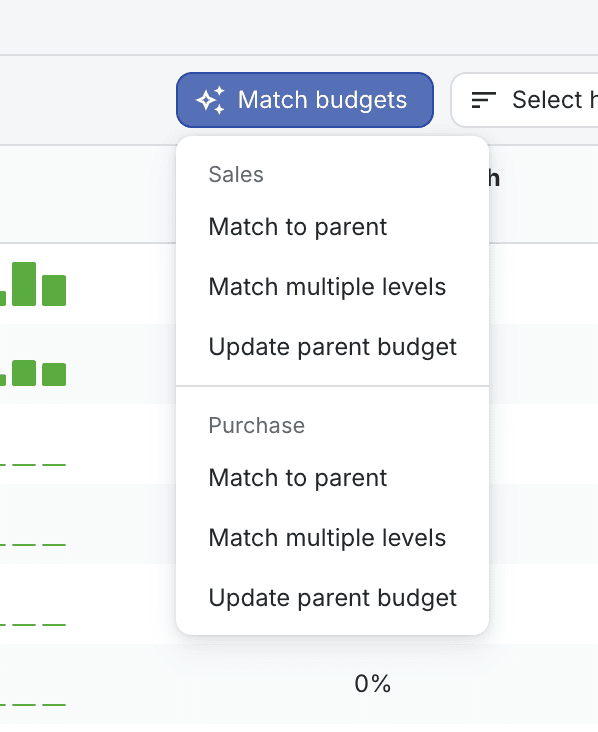
In the detailed Budget view, use Match budgets. The menu is split into Sales and Purchase, because sales and purchase budgets may need different logic.
Choose the direction
Workflow | Use it when | What changes |
|---|---|---|
Match to parent | The parent budget should control the child rows. | Madden previews changes to the current child rows. After confirming, use the main Save button to persist them. |
Match multiple levels | You want to apply parent matching across several hierarchy levels. | Madden runs the matching workflow down the tree and saves each matched level as it completes. |
Update parent budget | The child rows are reviewed and should become the parent total. | Madden saves the selected values to the parent budget after confirmation. |
Control what is allowed to change
When matching to parent, Madden shows a preview table before applying the update. Use row locks when a child row is already reviewed, intentionally constrained, or should not absorb the adjustment. Locked rows keep their current values, and the remaining unlocked rows absorb the difference.
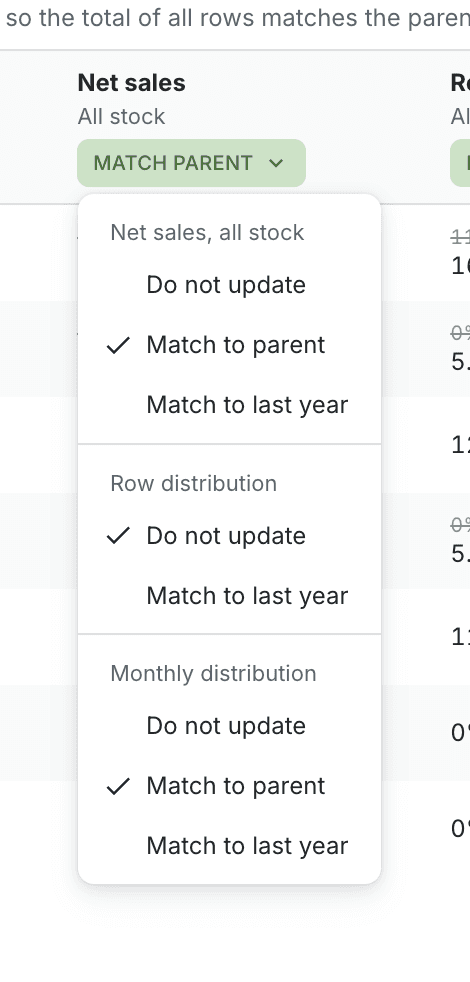
The matching settings can control both the target value and how the difference is distributed. Depending on the field, you can keep the current distribution, match the parent, use reference or last-year patterns, use COGS distribution, or spread values evenly. This gives you control over both the total and the timing or row split used to reach that total.
For example, you might match a category's net sales total to the parent while keeping the current child-row split, or you might use last year's distribution if the historical shape is more reliable than the current draft. For purchase value, COGS distribution can be useful when buying should follow the expected cost timing of the sales plan.
Sales and purchase behave separately
Sales matching can update fields such as net sales, return rate, gross margin, average discount, number of variants, and average sales price.
Purchase matching can update fields such as ingoing stock, COGS, purchase periods, purchase value, and sell-through comparison context.
Important save behavior
Match to parent updates the current Budget state first. It does not save by itself. After confirming the match preview, review the result and click the main Save button.
Update parent budget saves the parent budget directly after confirmation. Madden may ask you to save or discard unsaved child changes first, because the child state needs to be clean before updating the parent.
When to use each workflow
Use Match to parent when leadership or finance has already approved the parent target and the child rows need to be shaped to fit it.
Use Match multiple levels when you have a stable hierarchy and want the same matching logic applied repeatedly down the tree.
Use Update parent budget when buyers or planners have completed detailed work at the lower level and the parent should now reflect those reviewed child totals.
Common checks
If parent matching is disabled, check that you are following the budget hierarchy and not only viewing a summarized grouping.
If update parent is blocked, check the parent status. The parent budget must be editable.
If a row cannot be unlocked, Madden is protecting it because of status, outgoing sales status, or missing source data for the selected purchase logic.